

Ever wonder where the truly great deals on electronics are hiding? It's not about luck. The best bargains come from a smart mix of hunting on dedicated deal sites, exploring the refurbished market, and knowing which stores tuck away the best clearance items. If you know where to look, you can find some massive savings online.
Your Smart Guide to Finding Affordable Electronics
This isn't just another list of websites. I want to show you the why behind the savings. My goal is to give you a clear map of the cheap electronics landscape so you can start your search with confidence. You'll learn how direct-to-consumer models slash costs and why refurbished gear often offers unbeatable value for your money.
The journey starts by knowing your options. You've got two main routes: online marketplaces and the refurbished sector. Each one offers a different path to savings, from daily deals on brand-new items to deeply discounted gadgets that have been professionally restored.
Understanding the Savings Landscape
Online platforms have completely changed how we shop for tech. E-commerce sites are now one of the most accessible ways to buy electronics anywhere in the world, especially in big markets like North America and Asia. In fact, in 2024, e-commerce is expected to make up about one-third of all consumer electronics spending worldwide. That’s a huge slice of the pie and highlights just how central online shopping has become for finding competitive prices. You can explore the latest consumer electronic trends to see this growth for yourself.
This digital shift gives you a massive advantage. You can compare prices from dozens of retailers in minutes—a task that would have taken days of driving from store to store not that long ago.
Key Insight: The real secret to consistent savings isn't finding one magic website. It's about building a strategy that combines different sources—from major online retailers to specialized refurbishers—to match what you need with your budget.
This chart breaks down the typical savings you can expect from different sources.
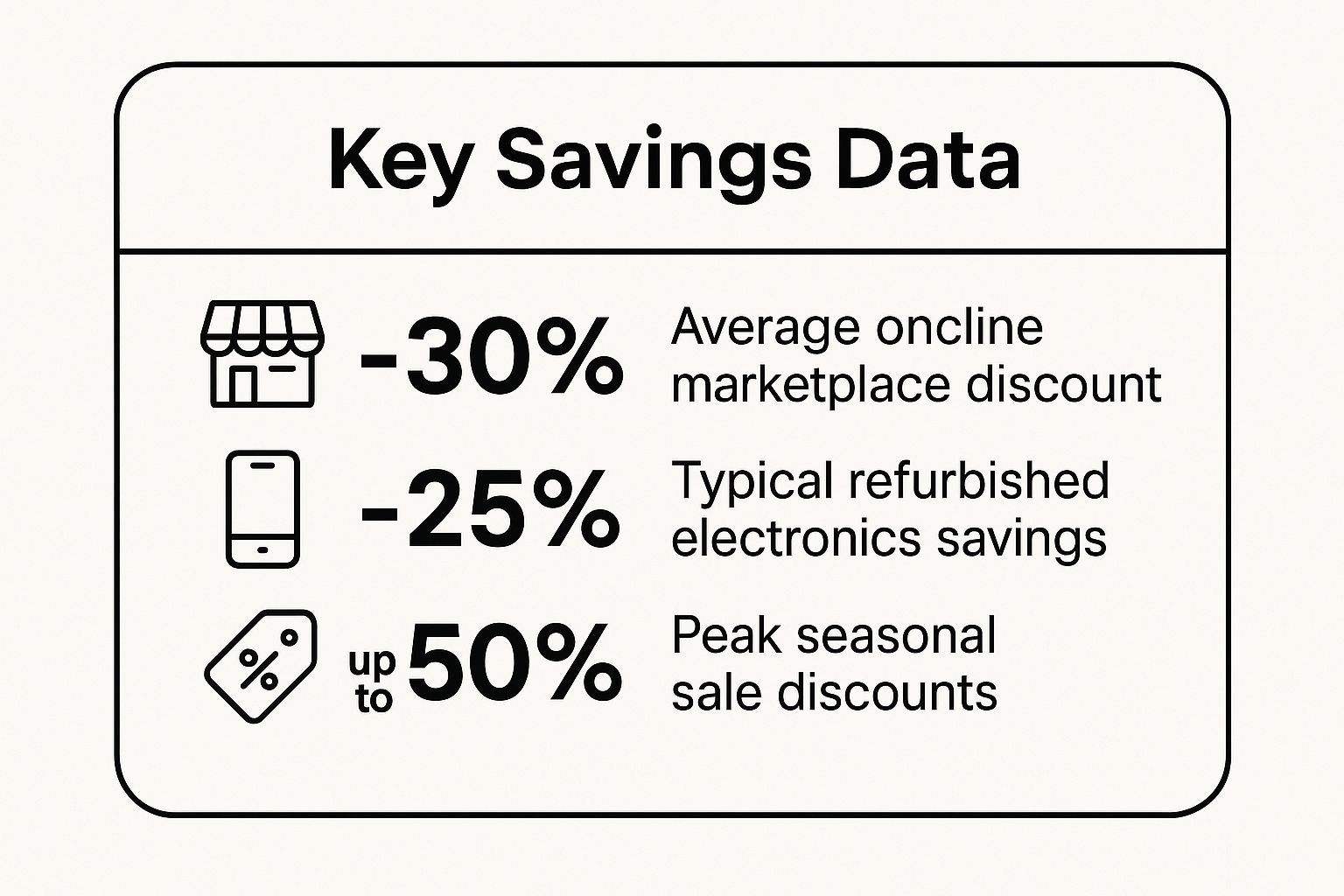
As you can see, timing your purchase around major sales events can land you the biggest discounts. But for year-round value, online marketplaces and refurbished options are hard to beat.
To help you visualize where to start your search, I've put together a quick-glance table of the top sources.
Top Sources for Cheap Electronics at a Glance
| Source Type | Best For | Typical Savings | Key Considerations |
|---|---|---|---|
| Online Marketplaces | New, open-box, and used items from various sellers. | 15-40% | Check seller ratings. Good for finding rare or discontinued models. |
| Refurbished Direct | High-quality, like-new items directly from brands like Apple or Dell. | 15-30% | Comes with a manufacturer warranty. Limited selection. |
| Third-Party Refurbishers | A wide variety of graded refurbished devices from multiple brands. | 20-50% | Warranty policies vary. Sites like Back Market offer huge selections. |
| Major Sales Events | Brand-new items during events like Black Friday or Prime Day. | 30-60% | Best deals are time-sensitive. Requires patience and planning. |
This table should give you a solid starting point for figuring out which avenue best fits your needs, whether you prioritize savings, quality assurance, or a wide selection.
Top Avenues for Bargain Hunters
Ready to get started? I recommend focusing your search on a few key areas known for consistent deals. These are the foundational spots every smart shopper uses to find cheap electronics without skimping on quality.
Here’s where you should begin your hunt:
- Online Marketplaces and Deal Sites: Places like Amazon Warehouse and eBay are absolute gold mines for open-box, returned, or lightly used items at a fraction of the retail cost.
- Manufacturer-Refurbished Stores: Buying refurbished gear directly from the source—think Apple's Certified Refurbished or Dell's outlet—guarantees a high-quality restoration and usually includes a solid warranty for peace of mind.
- Third-Party Refurbished Retailers: Specialized sites like Back Market or Gazelle have a massive inventory of devices from all sorts of brands. Everything is tested and graded, giving you tons of choice.
By exploring these avenues, you’re not just crossing your fingers for a random sale. You're actively targeting proven sources where value is baked into the business model. This strategic approach is how you turn bargain hunting from a game of chance into a reliable way to save money.
Mastering Online Marketplaces for Tech Bargains

When it comes to hunting for bargains, not all online stores are built the same. If you really want to find cheap electronics, you have to look past the front page and learn the art of navigating the digital giants. This means developing specific tactics for platforms like Amazon Warehouse, eBay, and even AliExpress.
Forget about just passively browsing. The real steals are found by people who actively hunt for them. I’m talking about setting up targeted price alerts for the exact models you want, using advanced search filters to find those hidden open-box deals, and knowing which sellers have a solid reputation for quality.
Unlock Deals on Amazon and eBay
Amazon Warehouse is always one of the first places I check. It’s where Amazon offloads products that have been returned, have damaged packaging, or are lightly used but still work perfectly—all at a significant discount. The secret here is to look closely at the condition descriptions. "Like New" is often just an open-box item that someone returned without even using it.
eBay is another beast entirely and requires a different strategy. Your success on eBay really comes down to how well you can vet the sellers. Always, always check their feedback score and read through recent reviews. I have a personal rule: I only buy from sellers with 99% or higher positive feedback, especially if it's a more expensive gadget. A great trick is to use the "Buy It Now" filter combined with "Condition: Open Box" to find deals you can grab right away without getting into a bidding war.
Pro Tip: Don't hesitate to use the "Make Offer" button on eBay. A lot of sellers are open to negotiation. I’ve personally snagged an extra 10-15% off the asking price just by sending a reasonable offer. It’s a simple click that can save you real money.
Leverage Community-Powered Deal Sites
Sometimes, the smartest way to find a deal is to let other people do the legwork. This is where community-driven deal sites are an absolute game-changer. These platforms are built by real users who find, share, and vote on the best offers from all over the web.
Here are a couple of the sites I check almost every day:
- Slickdeals: This is the undisputed king of deal communities. Users post deals, and the community picks them apart with votes and comments. If a deal makes it to the front page, you can be pretty confident it's a legitimate bargain.
- Woot!: Now owned by Amazon, Woot! runs daily deals and limited-time sales on a massive range of electronics. Their "Scratch & Dent" section is a goldmine for finding perfectly functional items with minor cosmetic flaws at a steep discount.
These sites offer more than just a list of discounts; they provide a crucial layer of social proof. The comment section is often where you'll find the real dirt—spotting potential issues with a product or a retailer before you commit to buying.
Use Browser Extensions to Your Advantage
If you want to take your bargain-hunting to the next level, you need the right tools. Browser extensions that track price history are completely non-negotiable for any serious deal seeker. They show you whether a so-called "sale" is actually a good deal or just a clever marketing tactic.
For instance, you might see a TV listed at 30% off, but a price history tracker could reveal it was even cheaper just two weeks ago. This kind of insight saves you from making impulse buys based on fake urgency. These tools arm you with the data you need to decide when it's truly the right time to buy.
The Smart Shopper’s Guide to Refurbished Tech
Let’s be honest, the word ‘refurbished’ can sound a little sketchy. It often brings to mind scratched-up gadgets sold out of a bin. But that’s not what we’re talking about here.
Think of it this way: you wouldn’t hesitate to buy a certified pre-owned car from a dealership, right? It’s been inspected, fixed up, and comes with a guarantee. That’s exactly what a good refurbished electronic is—a device that’s been professionally checked, repaired, and restored to perfect working condition. It’s a completely different ballgame from buying a random used phone off the street.
Manufacturer vs. Third-Party: What’s the Difference?
This is probably the most important thing to get right. Where your device was refurbished makes all the difference in what you get.
- Manufacturer-Refurbished: This is the best you can get. When you buy from a program like Apple Certified Refurbished or the Dell Outlet, the company that made the product is the one fixing it up. These items are often so pristine you can’t tell them from new. They almost always come with a full one-year warranty and all the original accessories.
- Third-Party Refurbished: This is when a retailer or a specialized company handles the restoration. Don’t be scared off! Reputable places like Back Market have built their entire business on having strict, multi-point checks. The warranty might be a bit shorter—usually between 90 days and a year—but this is where you’ll find the absolute best deals.
So, what's the trade-off? A manufacturer-refurbished laptop might be 15% cheaper than brand new. A top-quality one from a third-party seller, however, could easily be 30-40% less. You’re swapping a little bit of warranty length for a much bigger discount.
Interestingly, the global supply chain hiccups we saw during the pandemic have made refurbished an even smarter buy. To avoid future problems, many North American and EU companies are bringing production closer to home. Projections show local production jumping from 37% in 2024 to 41% in just three years. This shift means a more stable supply of locally refurbished electronics, making them a reliable and budget-friendly choice. You can read more about these consumer electronics trends and how they affect what's available.
Your Refurbished Buying Checklist
You can’t just jump on the first deal you see. To avoid getting burned, you need a system. I have a personal checklist I run through for every single refurbished item I consider buying. It helps me focus on genuine value, not just a low price tag.
My Two Cents: A great refurbished deal is about more than the price. It's the sweet spot between the item's condition, the warranty offered, and the seller's reputation. Never sacrifice the last two just to save a few extra bucks.
Before you even think about clicking "Add to Cart," make sure you check these things:
- Warranty: How long is it? What does it cover? I won’t even look at anything with less than a 90-day warranty. A shorter warranty is a major red flag.
- Return Policy: What if you get it and it’s not what you expected? You need an out. I look for at least a 14-day return window, no questions asked.
- Cosmetic Grade: Sellers use terms like "Excellent," "Good," or "Fair." Know what these mean for that specific seller. "Excellent" should look almost new, while "Fair" means you should expect some visible scratches or dings.
- What’s in the Box: Does it include a charger and cable? Some of the cheapest listings cut these out to lower the price, but then you have to buy them yourself, which can wipe out your savings.
- Battery Health: This is huge for phones, tablets, and laptops. Does the seller guarantee a minimum battery health? Look for a promise of 80% capacity or higher.
Stick to this checklist, and you can shop for refurbished tech with total confidence. It stops being a gamble and becomes one of the best ways to get fantastic electronics without draining your bank account.
Tapping Into International Markets for Direct Savings
Some of the absolute best deals aren't found in your local online stores. For that, you have to look beyond your borders and go straight to the source. This means buying from global platforms like AliExpress and Banggood, which connect you directly with manufacturers, mostly from the Asia-Pacific region.
When you do this, you’re cutting out several layers of middlemen. That’s a huge reason why the prices are so much lower. You're getting a price that's much closer to what it costs to actually make the item, which can lead to some serious savings on electronics.
Of course, it’s not as simple as just clicking "buy" on the cheapest listing. You need a little bit of savvy to make sure you get a great deal without the headaches.
Navigating Global Shopping Platforms
First things first: you have to figure out who you’re actually buying from. These sites are massive marketplaces with thousands of sellers all competing for your attention. I have a personal rule I stick to: I always dig into the seller's history. I’m looking for stores that have been around for at least two years with a positive feedback score of 95% or higher.
On top of that, check the product's order history. A gadget that has been ordered thousands of times with glowing reviews is a much safer choice than something with no track record. Think of it as your best defense against getting a dud.
There's a good reason the Asia-Pacific region is an electronics manufacturing powerhouse. Their massive infrastructure and competitive production costs are why the region accounted for roughly 38.1% of global consumer electronics revenue in 2024. This market dominance directly translates to the low prices you see. If you’re curious about the scale, you can see more data on the flexible electronics market.
Setting Realistic Expectations
When you buy direct from an overseas seller, you’re making a trade-off: you save money, but you sacrifice speed. That two-day Prime shipping we've all gotten used to? Forget about it.
Key Takeaway: Patience is absolutely essential. Standard shipping can take anywhere from three to six weeks. Always, always check the estimated delivery window before you finalize your purchase, and be ready for the wait.
Shipping time isn't the only thing to keep in mind. Here are a few other realities of shopping globally:
- Product Compatibility: Before you even add an item to your cart, double-check that it will work where you live. This is a big one for anything with a power plug—you might need an adapter. For phones or other cellular gear, confirm the device is unlocked and supports your local carrier’s frequency bands.
- Import Duties and Taxes: Depending on your country and the value of the item, you might have to pay import taxes or customs fees when it arrives. These fees aren't part of the price you pay on the site. A quick search for your country’s "de minimis value" will tell you the price threshold where these charges kick in.
- Customer Service: Getting help, processing a return, or troubleshooting an issue can be tricky across different languages and time zones. Your best bet is to stick with sellers who have clear, easy-to-understand return policies and are responsive to messages.
Keep these things in mind, and you can confidently dive into the world of global marketplaces to find deals that most people completely miss out on.
Finding Hidden Gems in Brick-and-Mortar Stores

It’s easy to get tunnel vision and do all your bargain hunting online. But you’d be amazed at the deals hiding in plain sight at your local stores. Think of it like a real-world treasure hunt—if you know where to look, you can snag cheap electronics that online shoppers will completely miss.
This isn’t about just wandering through big-box stores hoping for the best. It’s about having a game plan. You need to know how to spot the clearance sections, decode special price tags, and time your visits just right.
These physical stores have a constant pressure to move inventory, which creates some incredible opportunities for anyone willing to put in a little legwork.
Decoding In-Store Clearance Racks
The best deals are almost never on the main, brightly-lit aisles. Big retailers like Best Buy and Target have designated clearance areas, but they aren't always obvious. I’ve found some of my best tech deals tucked away at the very back of the store or on a random endcap near the stockroom.
You also have to learn the language of the price tags. At Target, for example, a yellow tag means clearance. But the real secret is the tiny number in the top-right corner—if you see a “70”, that item is a whopping 70% off. Learning these little tells can turn a boring shopping trip into a major score.
My Personal Experience: I once found a high-end router at Best Buy for 60% off. It was just an open-box return sitting on a bottom shelf in their clearance section, totally overlooked. The box was a little beat up, but the router inside was pristine.
Leveraging Outlet Stores and Local Shops
Beyond the usual chains, dedicated outlet stores are a goldmine. Brands like Dell and Sony run outlets where they offload last year’s models, refurbished gear, and overstocked items at a serious discount. You're still buying straight from the source, just at a much friendlier price.
And don't sleep on your local, independent electronics shops. These smaller outfits often rely on trade-ins or buy liquidated stock to fill their shelves. Some of my best camera lens deals came from a local shop that specializes in used photography equipment. You can often negotiate on price and even build a rapport with the owner, who might give you a heads-up when something good comes in.
Seasonal and End-of-Model Strategies
Timing is everything in the retail world. Physical stores have to make room for new inventory, and you can use that cycle to your advantage. The weeks immediately following major holidays, especially after Christmas, are fantastic for finding deals on returned items and leftover stock.
Another key window is right after a new model is announced. When the new iPhone drops, for instance, stores get desperate to clear out the previous generation. This end-of-model-year rush is your chance to find brand-new devices at a deep discount. It takes a bit of patience, but the savings on perfectly good tech are well worth it.
Your Questions About Finding Tech Deals, Answered
Even with all the best strategies in your back pocket, you probably still have a few questions rolling around. That’s perfectly fine—in fact, it's smart. When you're trying to hunt down genuinely cheap electronics, a healthy dose of skepticism is a good thing. A deal that looks too good to be true often is, but if you know what to look for, you can tell the real bargains from the duds.
Let's walk through some of the most common worries I hear from people just like you. My goal here is to give you straight-up answers so you can buy with more confidence and less guesswork.
Are Refurbished Products Actually Reliable?
This is, without a doubt, the number one question people ask. The short answer is a big yes—but only if you buy from the right source.
When a product is refurbished by the original manufacturer (think Apple's or Dell's own refurb programs), it's often impossible to tell it apart from a brand-new device. These items are put through a really strict testing process and almost always come with a solid warranty, typically for a full year.
What about third-party sellers like Back Market or Gazelle? They can be fantastic, but you have to do a little homework. My rule of thumb is to never buy from a seller that doesn't offer at least a 90-day warranty and a crystal-clear return policy. Good sellers stand behind their products because their reputation is everything. An "excellent" condition gadget from a trusted refurbisher is one of the smartest ways to get top-tier tech without the top-tier price.
Key Takeaway: The seller's reputation and the warranty they provide are what separate a great refurbished deal from a potential headache. That warranty is your safety net—don't buy without one.
Is It Safe to Buy Electronics From International Sites?
Shopping on massive international marketplaces like AliExpress can feel like a gamble, but it's generally safe if you know how to play the game. The real risks usually aren't outright scams but more practical issues, like surprisingly long shipping times or unexpected import fees.
To keep your purchase secure, just follow a few simple guidelines:
- Check the Seller's History: I only buy from stores that have been around for at least a couple of years and have a positive feedback score of 95% or higher.
- Look at Order Volume: A product with thousands of orders and a ton of positive reviews is a much safer bet than something with no sales history. Let other buyers be the guinea pigs.
- Use Protected Payment Methods: Always pay through the website's built-in checkout system or a service like PayPal. This creates a layer of buyer protection you can fall back on if things go sideways.
Just remember, patience is key here. Don't be surprised if your package takes a few weeks to arrive. It's all part of the trade-off for getting that super-low price.
When Is the Absolute Best Time of Year to Buy?
You can definitely stumble upon a great deal any day of the year, but some periods are predictably better for scoring cheap electronics.
The big one, of course, is Black Friday and Cyber Monday. That's when you'll see massive discounts on new products. But don't sleep on other key times of the year.
The weeks immediately following Christmas are a goldmine for open-box returns and clearance sales as retailers make room for new inventory. Another prime window is right after a major new product is announced. When the latest iPhone or laptop drops, stores are desperate to get rid of the previous generation's stock, often slashing prices to move them quickly. It's a strategy that requires a bit of patience, but it can reward you with brand-new tech for a fraction of what it cost just a few months earlier.
At Mr PriceStore Less Price, we bring the deals to you every single day. From high-tech gadgets and home essentials to automotive gear and fashion, our marketplace is packed with unbeatable prices. Discover amazing value and shop with confidence. Find your next great deal at Mr PriceStore Less Price today!
Article created using Outrank
Leave a Reply